> ## Documentation Index
> Fetch the complete documentation index at: https://ngquct-fix-rail-identity-badge.mintlify.site/llms.txt
> Use this file to discover all available pages before exploring further.
# Filtering
> Build a WHERE clause from the filter bar, or write one by hand, and save it as a preset
A filter is a WHERE clause, and it runs at the database. That is the difference between filtering and the find bar: matches come from every row in the table, not from the page you are looking at. Open the filter bar with `Cmd+Option+F`, type a condition into the row that appears, and press `Enter`.
 Each row has a drag grip, a checkbox, a column picker, an operator, a value field, and **+**/**−** buttons. Right-clicking a column header in the grid and choosing **Filter with column** pre-fills a row for that column.
| Control | What it does |
| - | - |
| Header **Apply**, `Enter` in a value field, or `Cmd+Enter` | Runs every checked row |
| Row checkbox | Turns that row off without deleting it. Press **Apply** to re-run |
| Row **Apply** | Filters by that row alone, without touching the checkboxes, so the header **Apply** brings the checked set back |
| **Clear** | Drops the applied filter and keeps the rows |
| Row grip, or right-click > **Move Up** / **Move Down** | Reorders the list. Order never changes the result |
| ⋯ > **Remove All Filters** | Deletes every saved row for this table |
Filters are saved per connection, database, schema, and table, and survive a relaunch, unchecked rows included. A table with an active filter opens in a new tab rather than replacing the current one.
Redis shows a key-pattern search bar (`user:*` and the like) with a key-type picker instead of the filter bar.
## Operators
Eighteen of them, and the menu shows the SQL each one produces.
| Operators | SQL |
| - | - |
| equals, not equals | `=`, `!=` |
| contains, not contains | `LIKE %..%`, `NOT LIKE %..%` |
| starts with, ends with | `LIKE ..%`, `LIKE %..` |
| greater than, greater or equal, less than, less or equal | `>`, `>=`, `<`, `<=` |
| is NULL, is not NULL | `IS NULL`, `IS NOT NULL` |
| is empty, is not empty | On a text column, NULL or `''`. On any other column, the same as is NULL |
| in list, not in list | `IN (..)`, `NOT IN (..)`, from comma-separated values |
| between | `BETWEEN`, with two value fields |
| matches regex | `~`, or the engine's own regex function. Where the engine has none, it falls back to contains |
## Case sensitivity
Contains, not contains, starts with, and ends with ignore case. Equals, not equals, IN, NOT IN, and regex respect it. Open the operator menu and use **Match Case** to flip either one for that row; an `Aa` badge marks a row that is not on its usual setting.
On MySQL, MariaDB, SQL Server, SQLite, libSQL, and Cloudflare D1 the column's collation decides, and no query can override it, so **Match Case** is dimmed. Their default collations already ignore case. Cassandra and Redis have no case-insensitive matching at all, so it is dimmed there too.
## Combining conditions
**Match all** and **Match any** in the header join every row with AND or OR. There is no per-row choice and no grouping, so a mixed expression cannot be built out of rows. Put the parentheses in a raw SQL row instead, which enters the WHERE clause as a single parenthesized condition:
```sql theme={null}
(status = 'open' AND priority > 3) OR escalated
```
⋯ > **Preview Query** shows the WHERE clause the rows produce, with a copy button.
An applied filter reaches an export only through the grid. **File > Export > Export Results…** writes the rows the grid holds; the toolbar export reads the table itself and ignores the filter bar. See [Import & Export](/features/import-export).
## Nested fields
On a document store such as MongoDB, a field holding an object or an array of objects is one column showing its JSON. The column picker also lists the paths inside it, so `customer.country` and `items.sku` filter directly.
Each row has a drag grip, a checkbox, a column picker, an operator, a value field, and **+**/**−** buttons. Right-clicking a column header in the grid and choosing **Filter with column** pre-fills a row for that column.
| Control | What it does |
| - | - |
| Header **Apply**, `Enter` in a value field, or `Cmd+Enter` | Runs every checked row |
| Row checkbox | Turns that row off without deleting it. Press **Apply** to re-run |
| Row **Apply** | Filters by that row alone, without touching the checkboxes, so the header **Apply** brings the checked set back |
| **Clear** | Drops the applied filter and keeps the rows |
| Row grip, or right-click > **Move Up** / **Move Down** | Reorders the list. Order never changes the result |
| ⋯ > **Remove All Filters** | Deletes every saved row for this table |
Filters are saved per connection, database, schema, and table, and survive a relaunch, unchecked rows included. A table with an active filter opens in a new tab rather than replacing the current one.
Redis shows a key-pattern search bar (`user:*` and the like) with a key-type picker instead of the filter bar.
## Operators
Eighteen of them, and the menu shows the SQL each one produces.
| Operators | SQL |
| - | - |
| equals, not equals | `=`, `!=` |
| contains, not contains | `LIKE %..%`, `NOT LIKE %..%` |
| starts with, ends with | `LIKE ..%`, `LIKE %..` |
| greater than, greater or equal, less than, less or equal | `>`, `>=`, `<`, `<=` |
| is NULL, is not NULL | `IS NULL`, `IS NOT NULL` |
| is empty, is not empty | On a text column, NULL or `''`. On any other column, the same as is NULL |
| in list, not in list | `IN (..)`, `NOT IN (..)`, from comma-separated values |
| between | `BETWEEN`, with two value fields |
| matches regex | `~`, or the engine's own regex function. Where the engine has none, it falls back to contains |
## Case sensitivity
Contains, not contains, starts with, and ends with ignore case. Equals, not equals, IN, NOT IN, and regex respect it. Open the operator menu and use **Match Case** to flip either one for that row; an `Aa` badge marks a row that is not on its usual setting.
On MySQL, MariaDB, SQL Server, SQLite, libSQL, and Cloudflare D1 the column's collation decides, and no query can override it, so **Match Case** is dimmed. Their default collations already ignore case. Cassandra and Redis have no case-insensitive matching at all, so it is dimmed there too.
## Combining conditions
**Match all** and **Match any** in the header join every row with AND or OR. There is no per-row choice and no grouping, so a mixed expression cannot be built out of rows. Put the parentheses in a raw SQL row instead, which enters the WHERE clause as a single parenthesized condition:
```sql theme={null}
(status = 'open' AND priority > 3) OR escalated
```
⋯ > **Preview Query** shows the WHERE clause the rows produce, with a copy button.
An applied filter reaches an export only through the grid. **File > Export > Export Results…** writes the rows the grid holds; the toolbar export reads the table itself and ignores the filter bar. See [Import & Export](/features/import-export).
## Nested fields
On a document store such as MongoDB, a field holding an object or an array of objects is one column showing its JSON. The column picker also lists the paths inside it, so `customer.country` and `items.sku` filter directly.
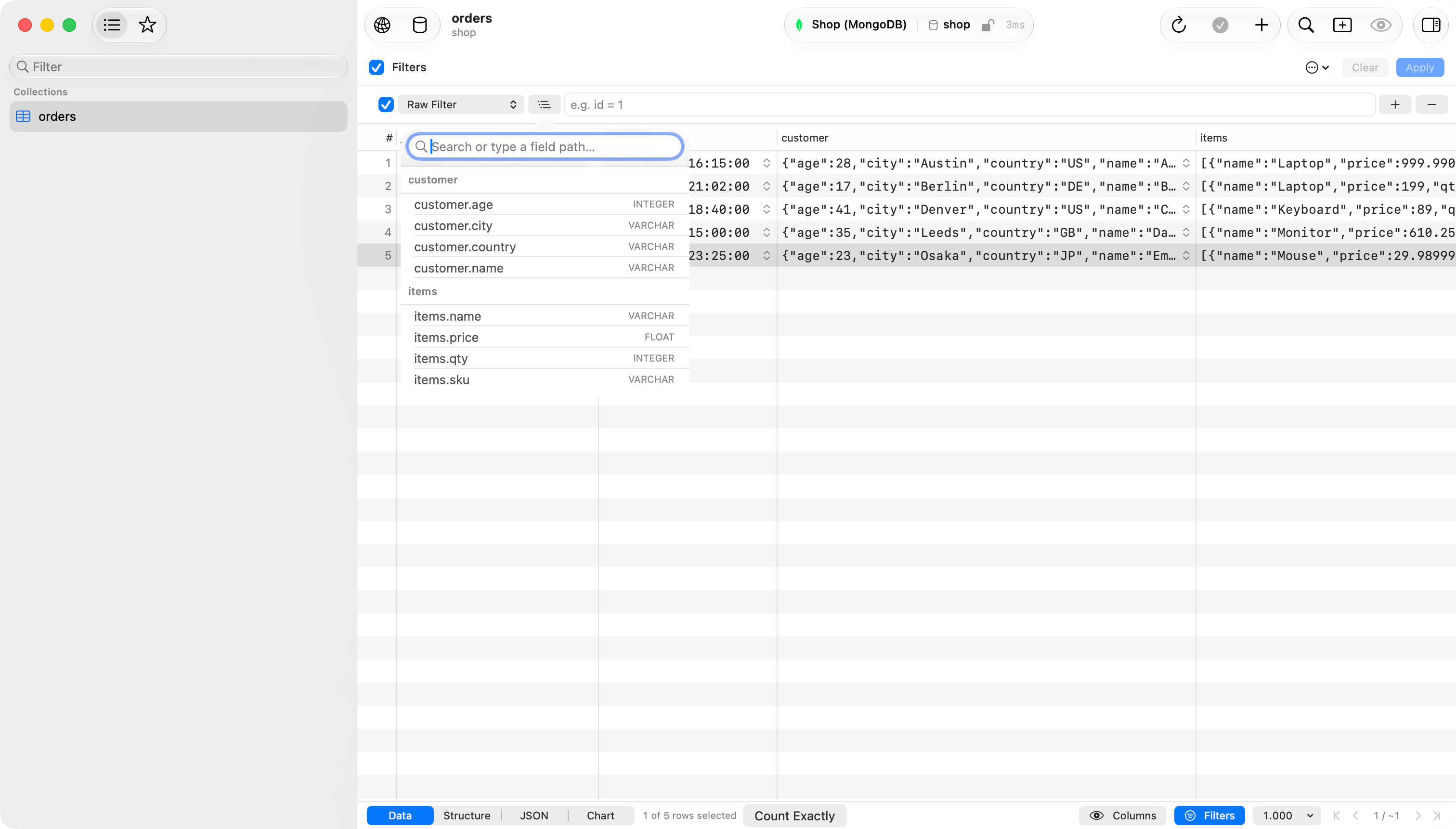
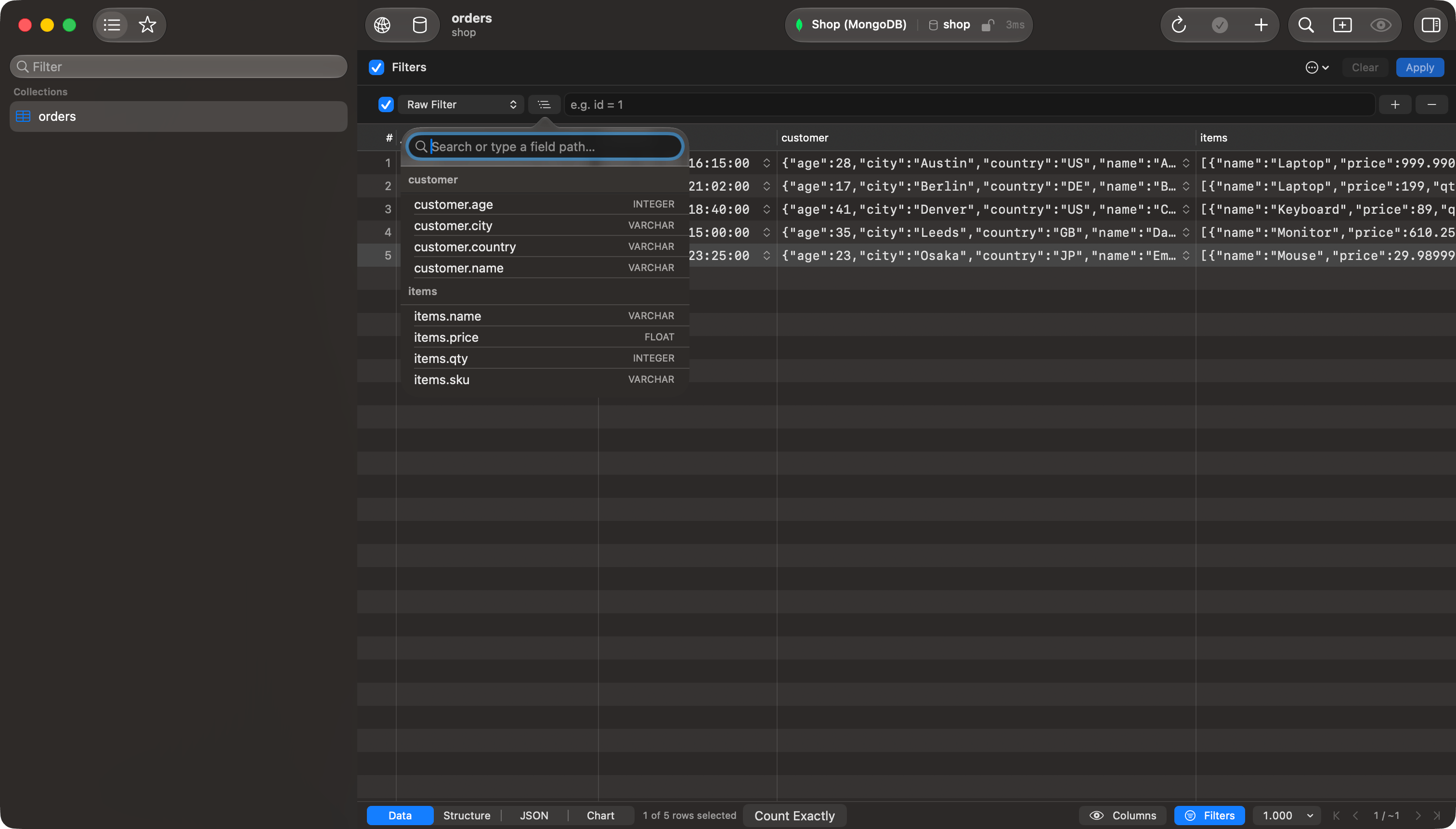 The paths come from a sample of the collection and only the first two levels reach the picker. The button beside it opens a searchable list of every path found, and a path typed there that no sampled document carried is used anyway, which is how to reach a field only some documents have. See [MongoDB](/databases/mongodb) for the fields this leaves out.
### Fields inside an array
A row on a field inside an array gets one more control:
| Setting | What it matches |
| - | - |
| **any element** | The row is satisfied by any entry in the array. Two rows can be satisfied by two different entries |
| **same element** | Every row set to **same element** for that array must be satisfied by one single entry |
Filtering `items.price` greater than 500 and `items.name` equal to `Laptop` with **any element** returns an order holding an expensive item and, separately, an item called Laptop. With **same element** on both rows it returns only orders holding one item that is both. **any element** is the default.
The paths come from a sample of the collection and only the first two levels reach the picker. The button beside it opens a searchable list of every path found, and a path typed there that no sampled document carried is used anyway, which is how to reach a field only some documents have. See [MongoDB](/databases/mongodb) for the fields this leaves out.
### Fields inside an array
A row on a field inside an array gets one more control:
| Setting | What it matches |
| - | - |
| **any element** | The row is satisfied by any entry in the array. Two rows can be satisfied by two different entries |
| **same element** | Every row set to **same element** for that array must be satisfied by one single entry |
Filtering `items.price` greater than 500 and `items.name` equal to `Laptop` with **any element** returns an order holding an expensive item and, separately, an item called Laptop. With **same element** on both rows it returns only orders holding one item that is both. **any element** is the default.
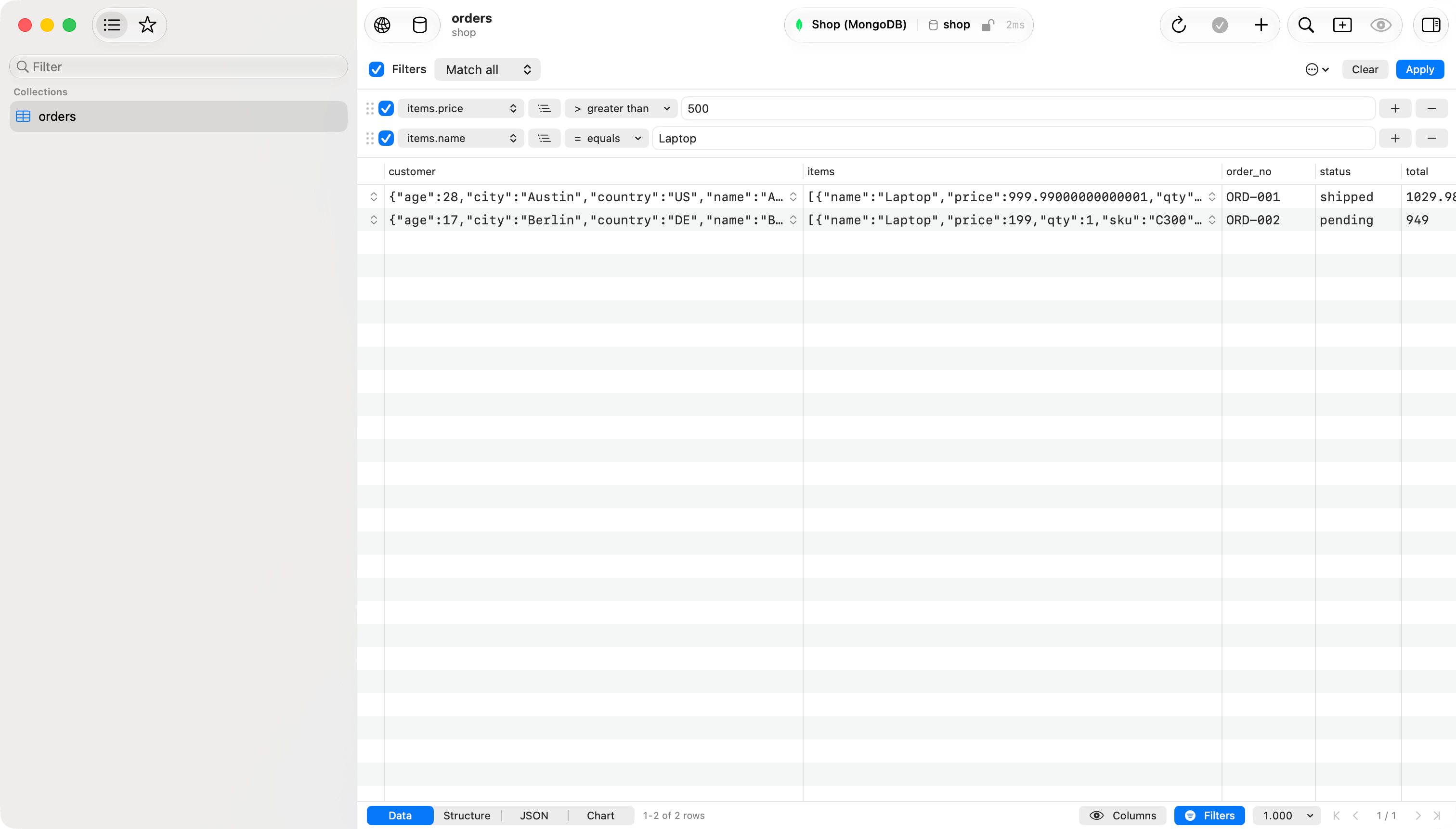
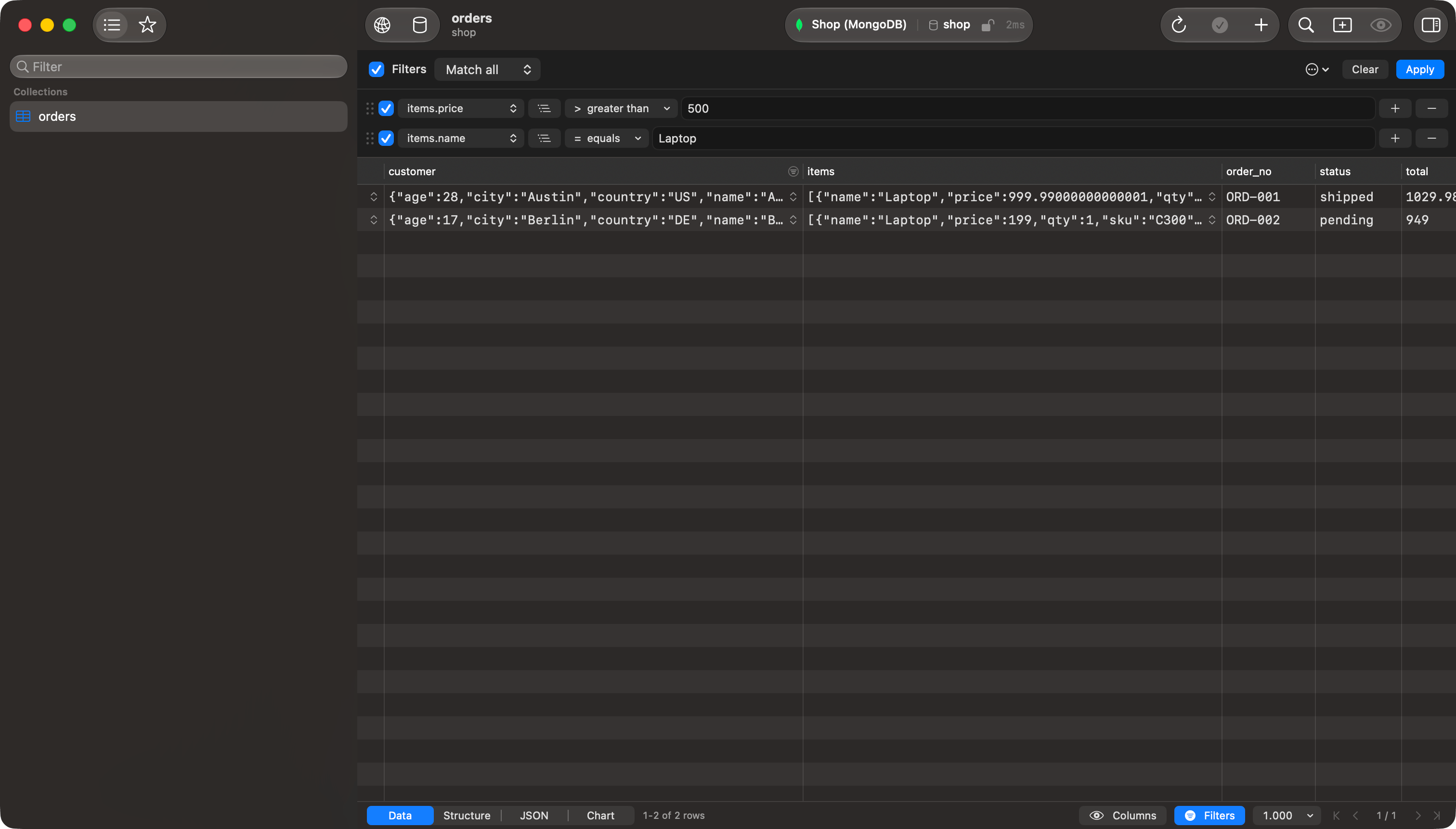 Rows sharing an array and set to **same element** group together, and **Match all** / **Match any** applies inside the group too.
## Raw SQL
A new row starts in raw SQL, unless **Default Column** in the settings says otherwise, and picking a column from its picker switches it to column mode. Type any WHERE condition:
```sql theme={null}
created_at > NOW() - INTERVAL 7 DAY
```
Autocomplete offers the table's columns and SQL keywords at every position, after AND and OR included. Arrow keys pick a suggestion, `Tab` or `Return` inserts it, `Escape` dismisses the list without closing the filter bar. On a database that does not speak SQL the row is labeled **Raw Filter** and takes that database's own syntax: on MongoDB, a filter document such as `{"customer.country": "US"}`.
The text goes into the WHERE clause as written. A condition whose syntax does not match the database fails the query.
## Presets and settings
Both live in the ⋯ menu. **Save as Preset…** stores the current rows, clicking a preset name loads it, and **Delete Preset** removes one.
**Filter Settings** sets what a new row starts as (**Default Column**: Raw SQL, Primary Key, or Any Column; **Default Operator**: Equal or Contains) and what happens when you reopen a table. **Restore Last Filter**, the default, brings back the filter you last applied; **Always Hide** reopens the table unfiltered with the bar closed; **Always Show** keeps the bar visible with no filter set.
This documentation is built and hosted on [Mintlify](https://mintlify.com), a developer documentation platform.
Rows sharing an array and set to **same element** group together, and **Match all** / **Match any** applies inside the group too.
## Raw SQL
A new row starts in raw SQL, unless **Default Column** in the settings says otherwise, and picking a column from its picker switches it to column mode. Type any WHERE condition:
```sql theme={null}
created_at > NOW() - INTERVAL 7 DAY
```
Autocomplete offers the table's columns and SQL keywords at every position, after AND and OR included. Arrow keys pick a suggestion, `Tab` or `Return` inserts it, `Escape` dismisses the list without closing the filter bar. On a database that does not speak SQL the row is labeled **Raw Filter** and takes that database's own syntax: on MongoDB, a filter document such as `{"customer.country": "US"}`.
The text goes into the WHERE clause as written. A condition whose syntax does not match the database fails the query.
## Presets and settings
Both live in the ⋯ menu. **Save as Preset…** stores the current rows, clicking a preset name loads it, and **Delete Preset** removes one.
**Filter Settings** sets what a new row starts as (**Default Column**: Raw SQL, Primary Key, or Any Column; **Default Operator**: Equal or Contains) and what happens when you reopen a table. **Restore Last Filter**, the default, brings back the filter you last applied; **Always Hide** reopens the table unfiltered with the bar closed; **Always Show** keeps the bar visible with no filter set.
This documentation is built and hosted on [Mintlify](https://mintlify.com), a developer documentation platform.